


DTFPartsStore.com
DTF White ink filter 5 Micron
DTF White ink filter 5 Micron
Couldn't load pickup availability
Say hello to the Ink Filter—your printer's new best friend! This little powerhouse is all about keeping things clean and smooth, ensuring your prints stay crisp and your ink flow stays spot-on.
Made from corrosion-resistant polymer, it’s built to last, handling even the toughest printing jobs with ease. Plus, it’s got a high filter precision—down to 5μ / m, so your ink stays pure and your prints stay flawless.
It’s super easy to use and even easier to replace, making your printer maintenance a breeze. So if you want reliable, long-lasting performance, this filter is the upgrade your printer deserves! Clean ink, perfect prints, all day long! 🎨✨

DTF Parts Store • Repair supportInstallation & troubleshooting
View safety steps and replacement checks
Know what to check, how to prepare safely, and what your technician should verify for this ink system. Machine layouts and wiring vary by model.
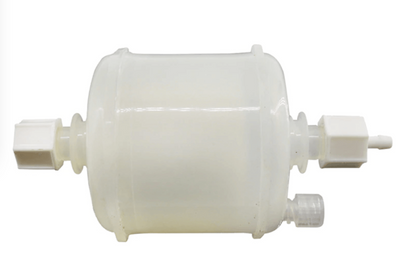
DTF White ink filter 5 Micron
Match before replacing:
Ink compatibility • size • flow direction • seal
Ink starvation, air in lines or leakage can arise from seals, tubing, pumps, dampers or capping. Confirm the cause before replacing parts.
Safety first — before access or repair
Follow the machine’s shutdown procedure. Isolate all power sources and prevent restart using the approved lockout procedure. Control stored energy and let heaters cool fully. An authorized person must verify isolation before work starts. The power button or emergency stop alone does not isolate electrical energy.
Electrical work, heaters and safety controls require a qualified technician. Never work inside a live cabinet, bypass guards or safety devices, or reach into moving rollers or fans. Follow the machine manual and powder/ink safety data sheet for required protective equipment.
Stop & isolate
Shut down, isolate supplies, prevent restart, control stored energy and verify the machine is safe to access.
Inspect & match
Follow the printer’s shutdown and ink-system service procedure. Use compatible gloves and eye protection, contain drips, and check visible leaks or air in the lines without touching the nozzle face.
Replace correctly
Use a trained technician and the exact printer service procedure for ink isolation, component replacement and priming. Preserve line routing and flow direction. Never force fluid into a printhead or substitute an unapproved solvent.
Verify operation
Check for leaks and complete the printer’s specified prime, nozzle check and calibration. Stop if ink reaches electrical connectors.
Stop and get help if…
You find burned wiring, repeated breaker trips, damaged safety controls, uncontrolled heating, ink on electronics, a mismatch in ratings, or a diagram that does not match the machine. Keep the machine out of service until a qualified technician resolves the fault.
What to send for model-specific help
Send the machine model and serial label, a clear photo of the original component and its markings, your symptom, and the relevant service-manual page. Take internal photos only after safe isolation by an authorized person. Do not unplug or move wires just to photograph them.
Need the procedure for your machine?
Send your model and original part photos so we can help confirm compatibility and the correct service reference.
Get part-specific help →This is a service planning overview. Use the exact machine and component manuals for removal, wiring, torque settings, calibration and commissioning. It is not a model-specific wiring diagram.