



Epson
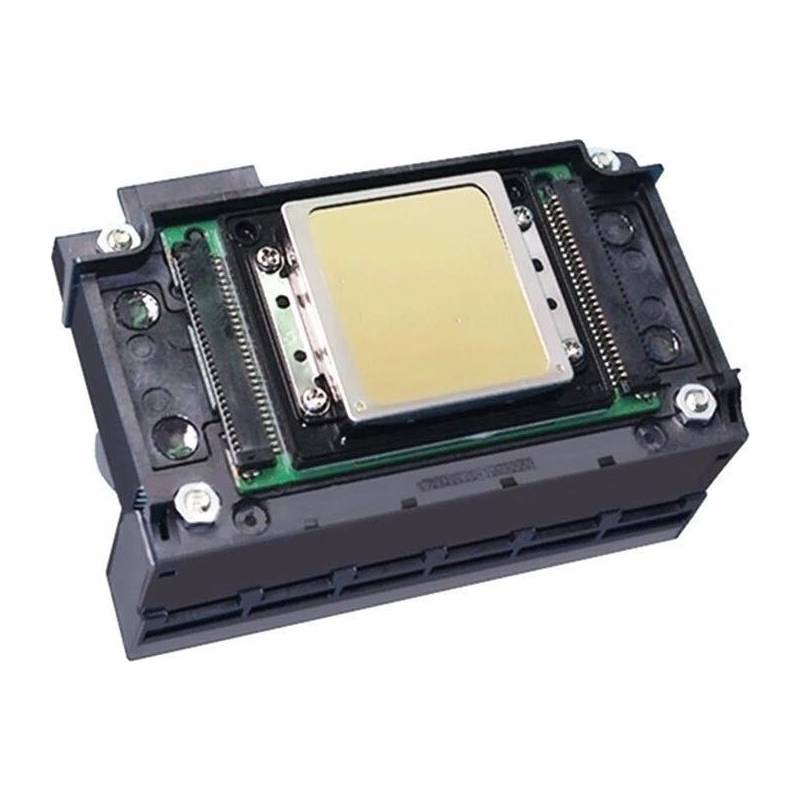
Epson xp-600 Print Head
Epson xp-600 Print Head
Couldn't load pickup availability
Epson Print Head Model Number(s):
- XP600 / F1080
- C14FA09122
- Epson XP510 XP600 XP601 XP605 XP610 XP615 XP700 XP701 XP750 XP
DTF Parts Store • Repair supportInstallation & troubleshooting
View safety steps and replacement checks
Know what to check, how to prepare safely, and what your technician should verify for this printhead. Machine layouts and wiring vary by model.
Epson xp-600 Print Head
Match before replacing:
Exact model • ink type • cables • calibration
Missing nozzles or print defects can also result from ink delivery, capping or alignment. Complete the specified diagnosis before ordering a head.
Safety first — before access or repair
Follow the machine’s shutdown procedure. Isolate all power sources and prevent restart using the approved lockout procedure. Control stored energy and let heaters cool fully. An authorized person must verify isolation before work starts. The power button or emergency stop alone does not isolate electrical energy.
Electrical work, heaters and safety controls require a qualified technician. Never work inside a live cabinet, bypass guards or safety devices, or reach into moving rollers or fans. Follow the machine manual and powder/ink safety data sheet for required protective equipment.
Stop & isolate
Shut down, isolate supplies, prevent restart, control stored energy and verify the machine is safe to access.
Inspect & match
Confirm the printer diagnosis and exact printhead model. Follow the printer maker’s shutdown and service procedure; protect the nozzle plate and electronics from touch, ink and static.
Replace correctly
Printhead replacement should be performed by a trained printer technician using model-specific instructions for ink isolation, cables, installation and calibration. Do not guess cable orientation or head settings.
Verify operation
Complete the manufacturer’s ink priming, leak checks, nozzle test and alignment before production. Stop if ink leaks onto electronics.
Stop and get help if…
You find burned wiring, repeated breaker trips, damaged safety controls, uncontrolled heating, ink on electronics, a mismatch in ratings, or a diagram that does not match the machine. Keep the machine out of service until a qualified technician resolves the fault.
What to send for model-specific help
Send the machine model and serial label, a clear photo of the original component and its markings, your symptom, and the relevant service-manual page. Take internal photos only after safe isolation by an authorized person. Do not unplug or move wires just to photograph them.
Need the procedure for your machine?
Send your model and original part photos so we can help confirm compatibility and the correct service reference.
Get part-specific help →This is a service planning overview. Use the exact machine and component manuals for removal, wiring, torque settings, calibration and commissioning. It is not a model-specific wiring diagram.